
- Digital Workers
- Written By Namita Bhagat
Digital Workers vs Off-the-Shelf Automation: Why You Need More Than Tools
06-Feb-2026 . 9 min read
Digital Workers vs Off-the-Shelf Automation is a dilemma many business leaders find themselves in. Plenty of packaged solutions are available. They offer faster deployment and lower upfront cost. So, why hassle to build?
However, what often gets overlooked is this: as complexity grows, plug-and-play automations begin to show their limits. Prebuilt workflows break under exceptions and scaling becomes hard. And teams scramble to plug the gaps that automation was meant to remove. At this point, you either need more hands or more technology.
This is the reality many mid-to-large organisations face as automation moves beyond isolated use cases and into core operations. And your off-the-shelf implementations are not enough to deliver the desired operational outcomes.
This is where Digital Workers add strategic value. They are not mere additions to your automation stack. They double as both a tool and a virtual employee, owning the work rather than just assisting with it.
Let’s explore this in detail.
Common Types of Off-the-Shelf Automation Tools
Off-the-shelf automation solutions are designed to standardise and accelerate repeatable work. This category includes a broad range of solutions, such as:
- RPA bots
These bots mimic human actions to move data across systems where APIs are unavailable.
- Workflow and BPM platforms
Tools that model and execute predefined process flows with built-in controls and compliance tracking.
- Workflow and BPM platforms
Tools that model and execute predefined process flows with built-in controls and compliance tracking.
- Integration and iPaaS tools
Platforms that connect applications using prebuilt connectors to enable cross-system automation.
- Embedded automation capabilities
OCR, classification, or recommendation engines bundled into enterprise software.
- Low-code automation solutions
Configurable citizen tools that help automate structured steps with minimal engineering effort. (Not ideal for sizeable businesses.)
These solutions are powerful and remove a lot of manual effort. But they work best when processes are stable, predictable, and closely aligned with a vendor’s predefined model.
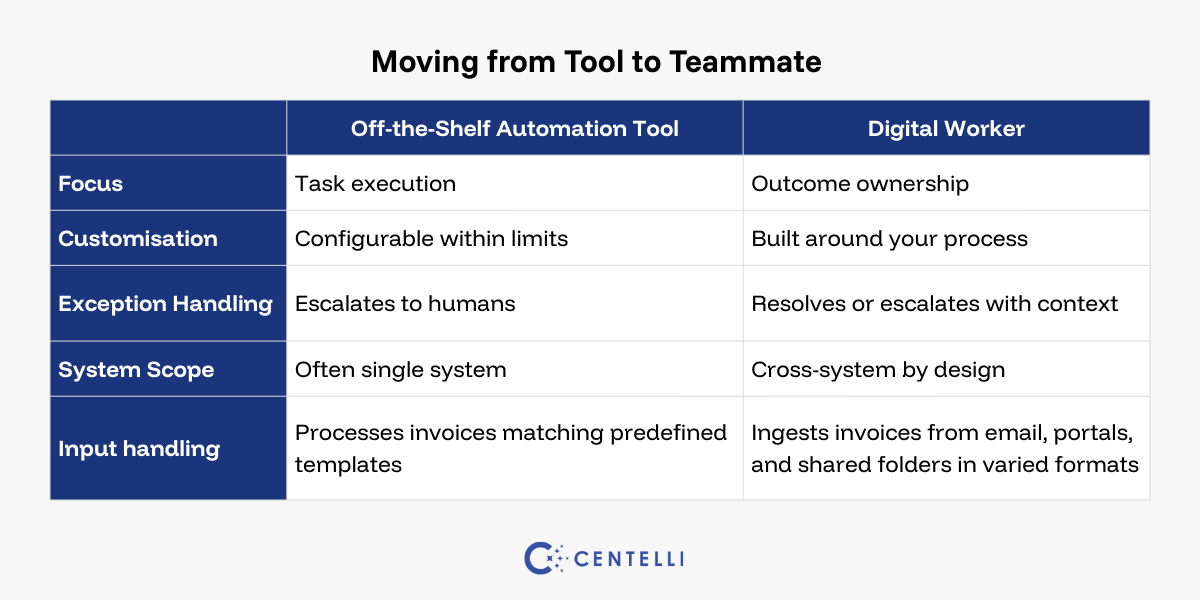
Yes, they are configurable and customisable but only to a point. Their capabilities are constrained by product architecture, upgrade paths, and vendor roadmaps. Over time, the limits become more visible!
Advantages
- Fast to implement with minimal setup
- Lower upfront cost compared to custom builds
- Familiarity and vendor support
Considerations
- Rigid workflows that do not adapt well to unique processes
- Integration challenges with legacy or niche systems
- Limited scalability as business needs evolve
Digital Workers vs Off-the-Shelf Automation at a Glance
The distinction between task and outcome focus, and tool versus role approach, tells a very different story, however.
Off-the-shelf automation tools are task-centric. They focus on executing predefined steps faster and more consistently. Responsibility for stitching those steps together, managing exceptions, and ensuring outcomes still sits with people.
Digital Workers are role and outcome-centric. They are custom-built around a role or process, trained to complete work end to end, and accountable for results rather than isolated actions.
The two approaches represent different stages of automation maturity. Both can use AI capabilities, but they are designed for different levels of process ownership.
Flexibility is another key difference!
Off-the-shelf tools are configurable within product boundaries. They optimise individual steps but do not own outcomes across systems, teams, and exceptions.
On the other hand, Digital Workers are custom-built from scratch and often bespoke. They replicate how work happens in your organisation, spanning edge cases, cross-system dependencies, and evolving rules. Also, they are mostly trained on proprietary data unless unavailable or insufficient.
Significantly, the differences are not theoretical. They directly affect accuracy, scalability, resilience, and how much human effort is required to keep automation running.
A Digital Worker Is More Than a Tool
A Digital Worker behaves less like software and more like your virtual team member. It can:
- Interpret unstructured inputs such as emails, documents, and tickets
- Apply business rules and judgement within defined guardrails
- Orchestrate multiple systems and tools
- Follow up, escalate, and resolve exceptions
- Learn from patterns and improve over time
Most importantly, it owns the work. Humans step in only when judgement, approval, or escalation is genuinely required. As a result, work continues without constant supervision.
So, tools assist people, but with limits. But Digital Workers reduce the need for people to intervene in the first place.
Advantages
- Built around your processes, roles, and outcomes
- Operate autonomously with minimal supervision
- Scale by adding capability, not just execution volume
Considerations
- Require upfront design, training, and governance
- Benefit most from deliberate scoping and planning
- Deliver maximum value when aligned to clear process ownership
Why Off-the-Shelf Automation Alone Doesn’t Scale
Automation ROI is not capped by how many tasks you automate. It is capped by how much manual effort remains around those tasks. Many a time, off-the-shelf automation creates faster steps, but also introduces:
- More exception queues
- More hand-offs
- More monitoring and maintenance
- More operational drag that rarely appears in use cases


Digital Workers reduce this hidden cost by absorbing variability, coordinating systems, and closing loops without constant human supervision. Notably, the opportunity cost of not using Digital Workers is often invisible. It shows up as slow scale, burnt-out teams, delayed outcomes, and automation programmes that stall after early wins.
Sign up for a free SAP automation trial with us. See how our custom-built automation unlocks more value from your SAP system.
How Digital Workers Work with Other Tools and Systems
Most large organisations already have automated systems. That is exactly why Digital Workers make sense. They are not a replacement for ERP systems, CRM software, or packaged automation tools. Digital Workers sit above them and use those systems intelligently, much like a human employee would.
This is how:
- A Digital Worker can operate across ERP systems, email, vendor portals, and document repositories.
- It can coordinate RPA bots, workflows, and APIs without being limited to one environment.
- It fills the gaps where tools stop and humans usually take over.
Notably, a hybrid automation strategy works best in most scenarios. Standard tasks remain within standard systems. Complex, exception-heavy, and cross-system work is delegated to Digital Workers. Additionally, a Digital Worker acting as a tool can replace a readymade counterpart where appropriate.
Example 1: Vendor / Supplier Payments
Finance software handles scheduled payments and basic reconciliation well. However, staff often step in manually when invoice mismatches occur, approvals are delayed, or data must be coordinated across ERP systems, banking portals, and vendor records.
You can train a Digital Worker to the role of a payment clerk, managing supplier payments end to end, validating invoices and approvals, and following up on discrepancies automatically. Human intervention is needed only for critical exceptions.
Example 2: Hospitality Booking Management
Legacy / off-the-shelf booking system handles reservations, pricing, and confirmations efficiently. However, when bookings change at the last minute, inventory conflicts arise, or requests come through email and third-party platforms, teams often intervene manually.
However, you can deploy a Digital Worker, acting as a reservation executive, to coordinate bookings across PMS, OTAs, CRM, and payment systems. It validates availability, manages changes and cancellations, follows up with guests, ensuring the booking lifecycle completes smoothly. And with minimal human involvement!
So, you can see, many steps may start inside off-the-shelf systems but spill into email, spreadsheets, portals, and manual follow-ups when exceptions arise.
Digital Workers vs Off-the-Shelf Automation: Work in Real Scenarios
To make the distinction concrete, let’s look at how routine business processes are handled using off-the-shelf automation tools compared to a Digital Worker model.
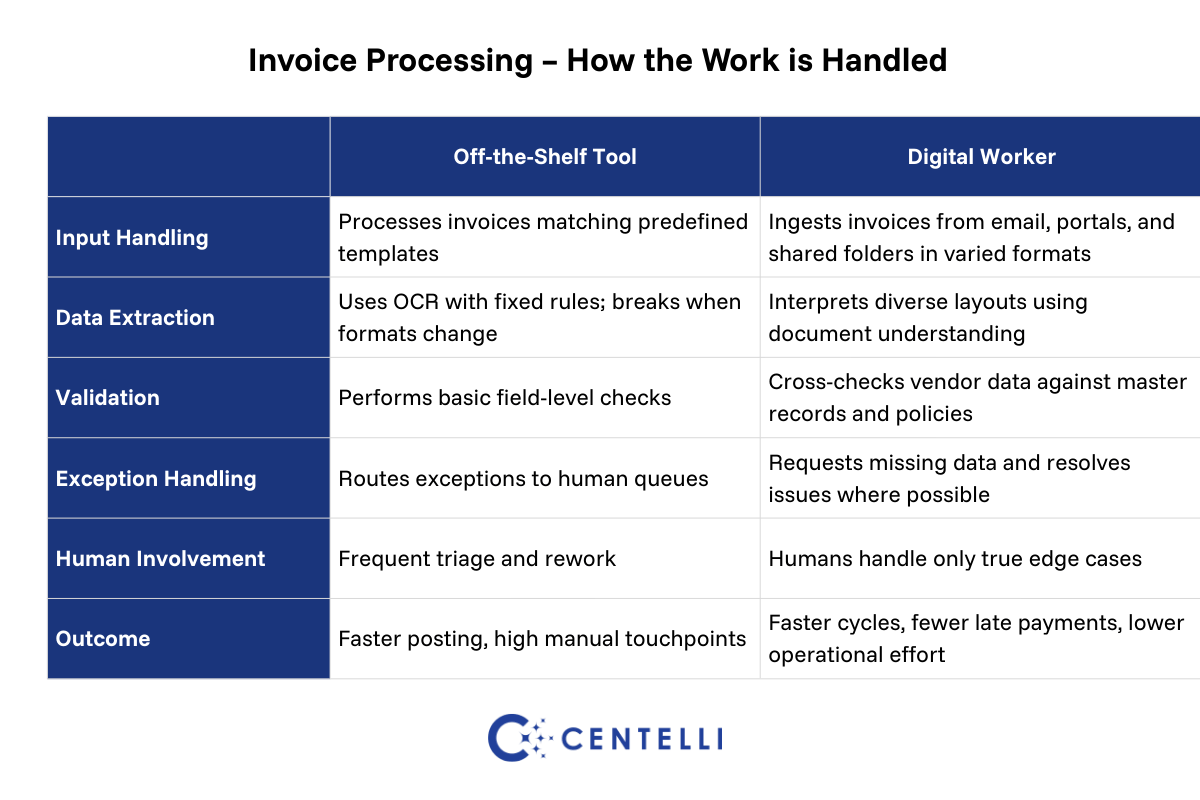
Invoice Processing
Off-the-shelf automation:
Invoice processing typically relies on predefined templates and rules. OCR extracts data from known formats, workflows route invoices for approval, and exceptions are pushed to accounting teams when formats change, data is missing, or validations fail.
You see manual triage increase, as volume and vendor diversity grow.
Digital Worker:
A Digital Worker approaches invoice processing as an end-to-end responsibility. It ingests invoices from multiple channels, interprets varied formats, validates vendor data, follows up for missing information, applies approval logic, and posts transactions. Human involvement is limited to true exceptions.
You achieve fewer manual touchpoints, faster cycle times, and lower operational overhead.
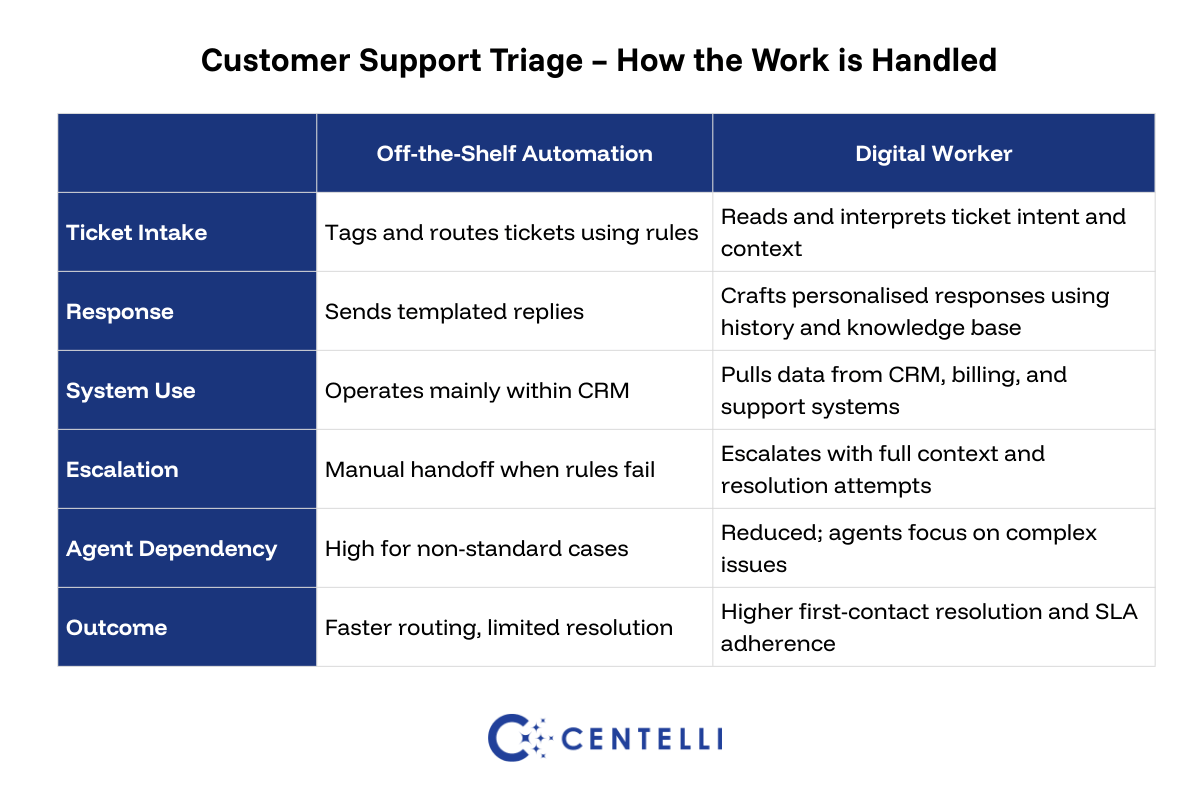
Customer Support Triage
Off-the-shelf automation:
Automation tools focus on routing and basic responses. Tickets are tagged, assigned to queues, and templated replies are sent. When issues fall outside predefined categories, agents must gather context across systems and decide next steps.
You end up with fragmented workflows and slower customer communication.
Digital Worker:
A Digital Worker reads each ticket in context. It pulls customer history, attempts resolution using knowledge bases and past cases, updates CRM records, and escalates only when needed, providing agents with a complete context summary.
You cut down agent load, improve first-contact resolution, and shorten response times without compromising service quality.
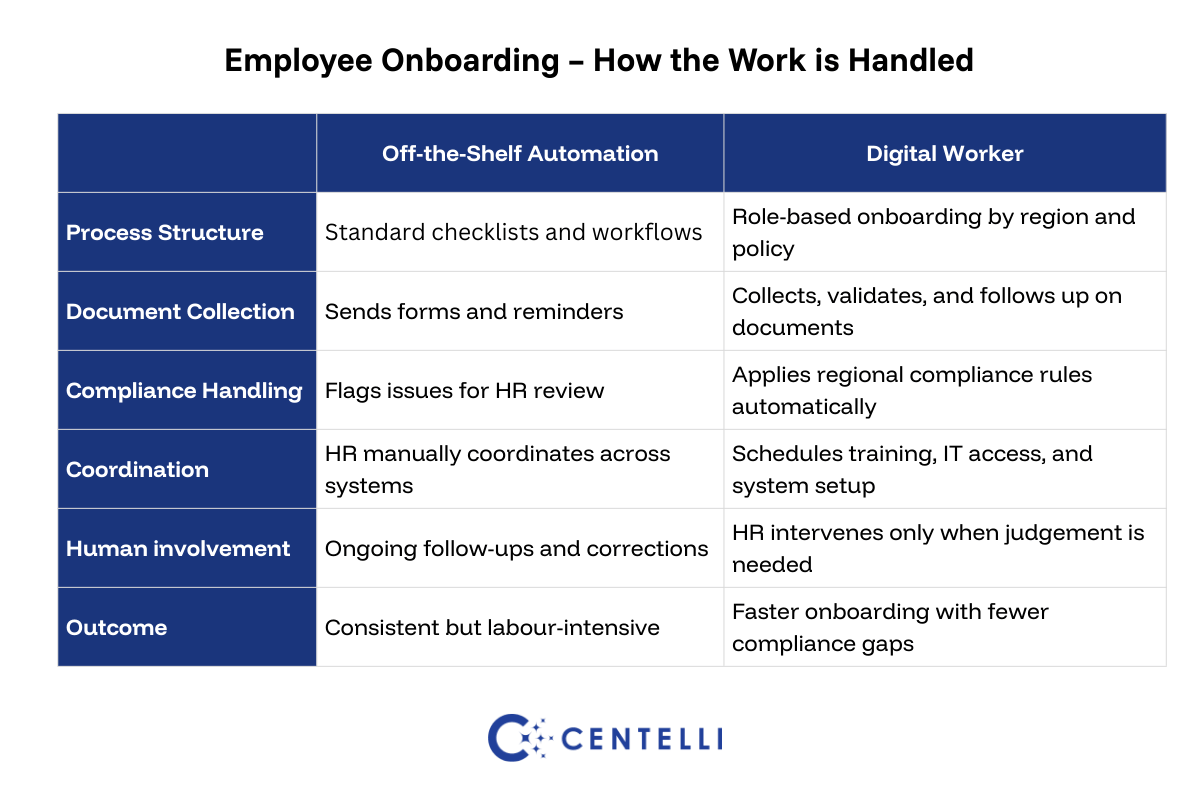
Employee Onboarding
Off-the-shelf automation:
In onboarding, off-the-shelf automation typically sends standard checklists and forms through an HR system. When documents are missing, compliance rules vary by region, or steps fall out of sequence, HR team steps in to chase, coordinate, and correct.
You are adding HR workload and creating friction for new hires.
Digital Worker:
A Digital Worker manages onboarding as a role-based process. It collects and validates documents, applies regional compliance rules, schedules training and system access, and follows up automatically. HR teams are involved only when judgement or exceptions arise.
So, you get faster onboarding, fewer compliance gaps, and a smoother experience for new employees.
Automating via Digital Workers Is a Strategic Move
Digital Workers turn automation from a collection of tools into an operating layer. Their value compounds over time:
- As more processes are automated
- As more systems are connected
- As fewer exceptions reach human teams
- As human capacity is redirected to higher-value work
Importantly, they protect previous automation investments. Instead of replacing existing tools, Digital Workers increase their utilisation and effectiveness.
Therefore, used well, Digital Workers do not just reduce cost. They increase organisational agility, resilience, and speed to outcome. Unlike tools and platforms, Digital Workers and agentic automation move from task execution to role ownership. In that sense, they function as digital FTEs.
Digital Workers and Off-the-Shelf Automation Can Work Together
When it comes to automation strategy and execution paths, framing it as a choice between tools and Digital Workers can be limiting. Off-the-shelf tools have their own advantages.
Because as operations grow larger or more complex, off-the-shelf solutions become harder to scale. Manual work increases as automation gaps appear within rigid workflows. Cross-system bottlenecks and silos develop, which in turn require more people to fill the cracks. The result is errors, rework, fragmentation, delays, downtime, and burnout.
Digital Workers have a scope and utility, therefore. They replace manual effort where there are need and gaps. Also, amplify existing legacy and off-the-shelf systems by integrating with and orchestrating them.
Discover how we can help you unlock better returns from your automation initiatives by deploying custom-built Digital Workers that seamlessly integrate with your legacy systems and off-the-shelf applications. Book a no-obligation call to get started.
Off-the-shelf automation is often good enough until its limits show up. That is why organisations and enterprises across the spectrum are increasingly deploying Digital Workers alongside existing tools. This helps maximise automation ROI.
As such, a deliberate move beyond isolated automation wins could be your way forward to sustained operational impact.
Key Takeaways
- Automation value comes from reducing manual work, not buying fancy tools.
- Digital Workers are autonomous, while tools need supervision.
- Tools work in silos; Digital Workers connect them.
- Digital Workers are tailored to your workflows, not vendor limits.
- Digital Workers amplify existing off-the-shelf automations, maximising automation ROI.
- Digital Workers vs Off-the-Shelf Automation isn’t a real debate. It’s how you can improve operations and grow sustainably.