
- Intelligent Automation
- Written By Namita Bhagat
Automating Unstructured Data for Scalable, Unattended Workflows
28-May-2026 . 7 min read
Automating unstructured data enables businesses to process and analyse information at scale. It opens the door to strategic business intelligence that manual processing cannot unlock.
As per industry analysts, 80–90% of business data is unstructured, trapped in emails, documents, voice and visual records. Manual handling is neither sufficient nor efficient, and therefore, most of this data goes untapped while more continues to accumulate across channels.
Here, thoughtful application of automation and AI would convert massive amounts of free-form inputs quickly into structured, actionable formats. The transformation also improves data usability, governance and compliance.
In this write-up, we’ll discuss:
- Structured data vs unstructured data and their impact on workflows
- Why unstructured data becomes difficult to process at scale
- How Digital Workers automate unstructured data processing
- Our real-world unstructured document processing automation case study (We helped a client cut manual effort by ~90% and achieve unattended workflows)
Structured Data vs Unstructured Data in Business Workflows
Operational, market, and customer data are every business’s lifeline. However, data provides value only when organisations can process and act on it effectively. Structured data arrives in formats systems can readily ingest, classify, query, and route across workflows. Unstructured data, however, usually requires interpretation before systems can process it.
Hence, the biggest differentiator for structured data vs unstructured data is ‘system readiness’.
What Makes Structured Data ‘System Ready’?
Structured data follows predefined formats. It sits neatly inside DBMS, CRM, and ERP systems, making it easier to search, retrieve, and analyse.
Common examples include:
- Customer IDs in billing and CRM systems
- Invoice numbers and payment records
- Order status, inventory data, tracking IDs
- Spreadsheet and relational database records
Because structured data follows a fixed format, it moves seamlessly across operational systems and enables straight-through processing. Teams can complete reporting, approvals, reconciliation, and decision-making with fewer interruptions.
Why Unstructured Data Creates Workflow Friction
Unstructured data has no fixed schema. It spreads across text, audio, and visual formats, making it difficult to process without advanced automation and AI capabilities.
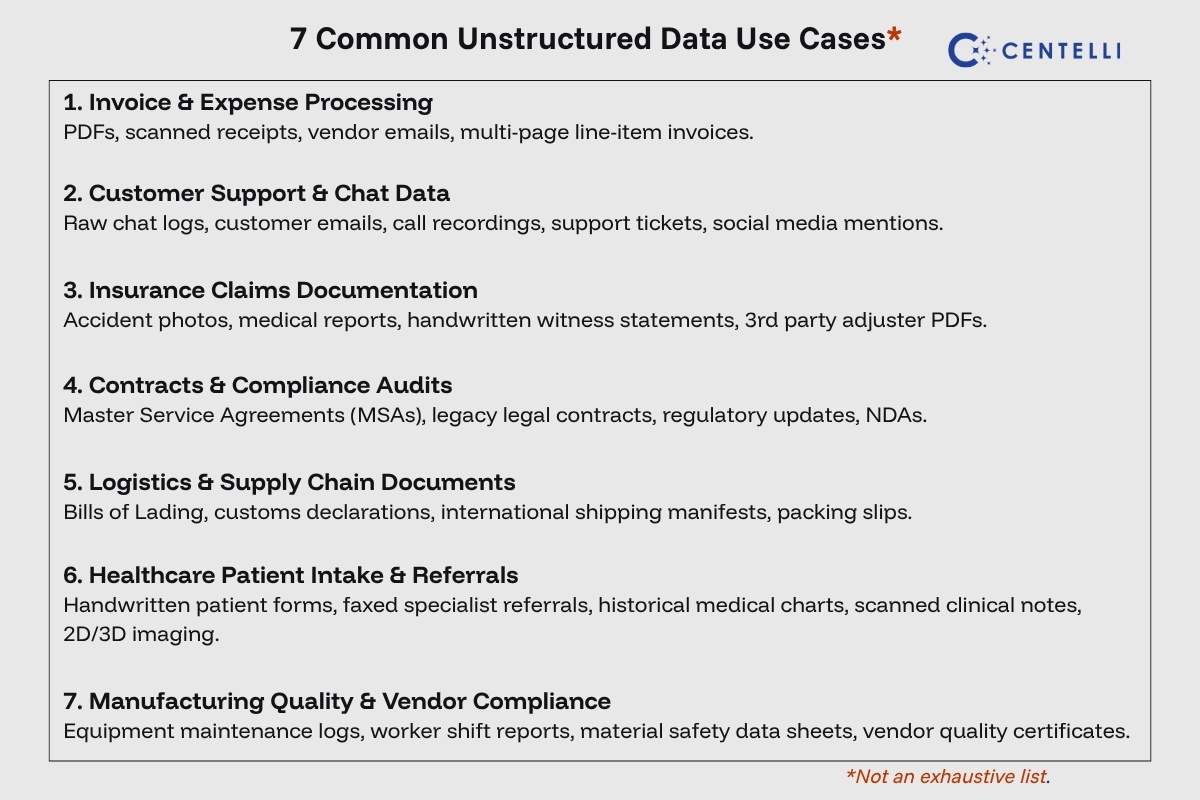
Common examples include:
- Emails and attachments
- Contracts, PDFs, and handwritten forms
- Voice recordings and call transcripts
- Images, screenshots, and visual records
- Chat conversations and free-text inputs
Interestingly, much of critical business context resides here. Customer intent, compliance evidence, operational exceptions, service issues, and market signals rarely arrive in predefined formats.
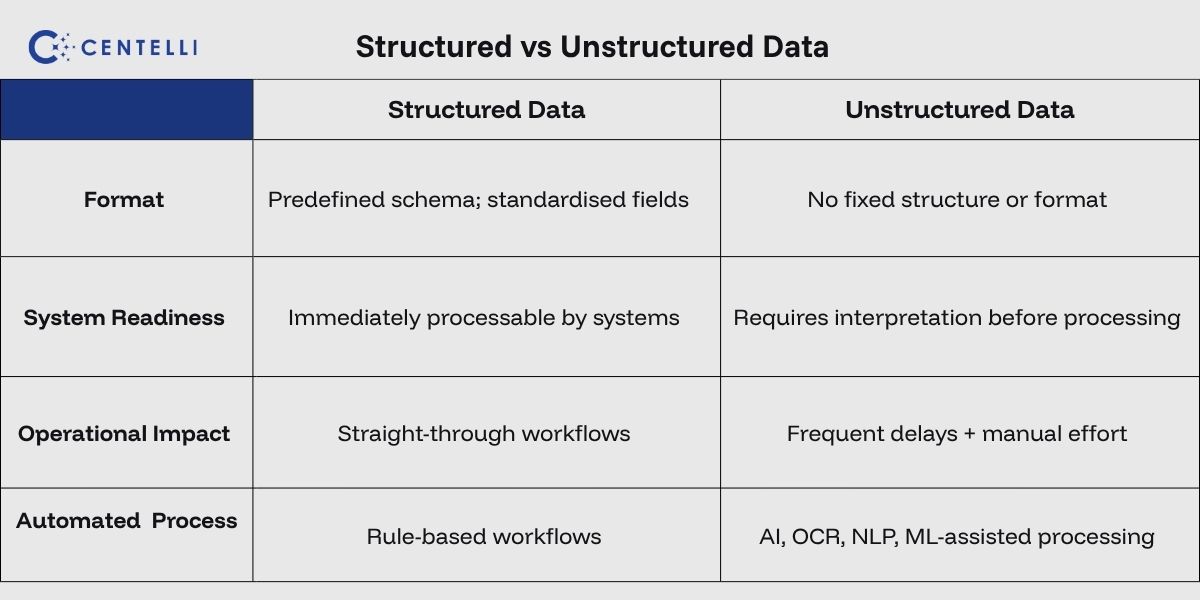
This difference also shapes how operations run. Structured information flows cleanly through workflows. Unstructured inputs introduce friction because teams frequently need to interpret, validate, or manually review information before tasks can move forward. They also must move data across disconnected systems. Consequently, delays build up, human errors are frequent, and turnarounds are slower.
As data volumes grow, scaling becomes impossible with existing team capacity or limited automation. And you must look for more effective solution for automating unstructured data at scale.
Automating Unstructured Data for Structured, System-Ready Inputs
Modern automated data pipelines thrive on clean, actionable input. You can use automation to convert unstructured inputs into structured formats and make them system ready. However, automating this transformation process is not straightforward. Here are some challenges and automation nuances you need to be mindful of:
High Variation and Lack of Standard Structure
Unstructured data does not follow predictable patterns. A single business process may receive documents from hundreds of vendors, each using different layouts, wording, and formats.
Automation Challenge: Traditional automation rules and template-based extraction break when layouts change or new fields appear. A shifted line item, missing label, or unfamiliar format can immediately interrupt processing. Building automation flexible enough to handle this variation without constant maintenance becomes difficult at scale.
Data Quality and Noisy Inputs
Raw information rarely arrives clean. Documents may be blurry, scans incomplete, email threads cluttered, or audio recordings unclear.
Automation Challenge: Poor input quality directly reduces extraction accuracy. Your automated pipeline requires sophisticated pre-processing to clean or normalise information before core systems can use it reliably. As data grows, manually verifying noisy inputs slows workflows and reduces processing speed.
Context, Ambiguity, and Business Meaning
Business communication rarely follows fixed rules. Emails, notes, and documents often include abbreviations, technical jargon, implied meaning, or incomplete information.
Automation Challenge: Extracting text is only one part of the process; the automation must also understand context before triggering the next action. A sentence or a text may appear simple but still require business logic to determine whether a case should progress, pause, or escalate.
Data Accuracy, Governance, and Compliance
Unstructured information often contains sensitive financial, legal, customer, or operational data.
Automation Challenge: Processing workflows must be accurate, auditable, and compliant. Standard AI models may occasionally misread context or return inconsistent outputs without proper controls. You need strict governance safeguards to protect data privacy when structuring information at scale.
Disconnected Systems and Manual Dependencies
Extracting data is only part of the process; the information must still move smoothly across CRMs, ERPs, spreadsheets, shared inboxes, and legacy systems.
Automation Challenge: Many applications cannot readily exchange or process unstructured information. Without a seamless integration layer, teams end up manually copying and pasting newly extracted records into target applications. These manual dependencies slow downstream operations and make unattended workflows harder to achieve.
Given these challenges, you need a compliant automation solution that reduces manual effort, scales efficiently and integrates easily with legacy systems and modern tools. In essence, a solution where deterministic, rule-based logic and intelligent capabilities converge, mitigating compliance risk and AI hallucinations. Think of intelligent automation via Digital Workers!
Need help automating unstructured data? Discover how our custom Digital Workers eliminate manual bottlenecks and enable scalable, unattended workflows. Book a free consultation with Centelli today.
How Digital Workers Automate Unstructured Data
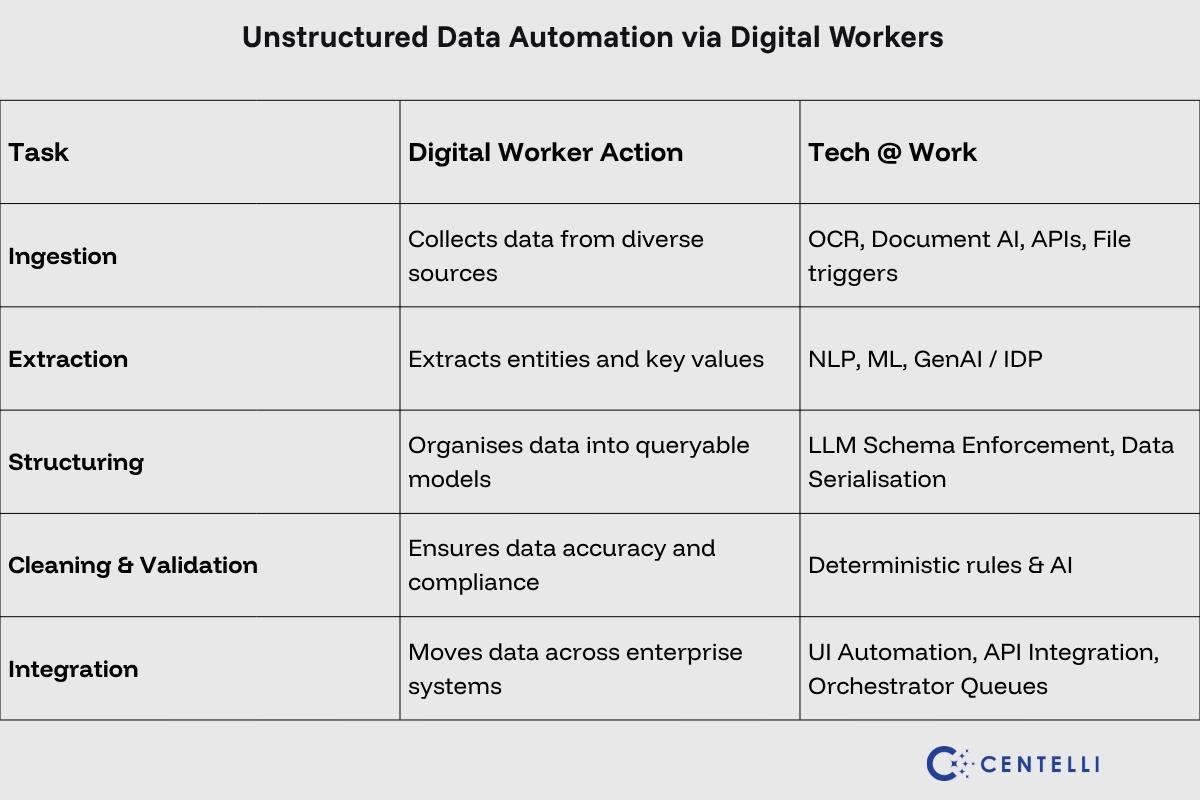
Customised Digital Worker software processes unstructured data by leveraging a mix of pre-fed logic combined with AI such as OCR, ML, and NLP as needed. They extract, classify, validate, and format information from text, audio and visual formats, reducing repetitive, time-consuming manual routines.
This is how Digital Workers execute end-to-end data flows:
1. Data Ingestion
- Pull incoming data from emails, PDFs, scanned documents, APIs, and web platforms automatically
- Convert text locked inside images and scanned files into machine-readable formats
- Move captured information directly into enterprise systems, removing the need for repetitive manual entry
2. Data Extraction
- Use Natural Language Processing and Machine Learning to identify entities, business terms, and contextual meaning
- Capture information such as names, invoice numbers, dates, and amounts from different document layouts
- Adapt to varying templates across vendors, document types, or departments without breaking workflows
3. Data Structuring
- Organise raw, free-form inputs into structured, queryable formats
- Turn text, audio transcripts, or images into usable structured datasets
- Prepare structured information for analytics, reporting, and operational systems
4. Data Cleaning & Validation
- Identify duplicates, missing fields, or inconsistencies during processing
- Validate information against business logic before systems act on it
- Flag unusual patterns or low-confidence outputs for manual validation as needed
5. Integration & Workflow Automation
- Pass clean information between CRMs, ERPs, databases, and operational platforms
- Automate compliance checks, reporting, and audit trails
- Connect unstructured insights with structured datasets to improve operational decision-making
Digital Workers work round-the-clock, ensuring your structured data pipelines run efficiently while powering systems and highly autonomous workflows.
Building Unattended Unstructured Document Processing for Our Client
Let’s look at a real-world example of how we helped a client automate unstructured document processing using Digital Workers. The company had three to four (3-4) employees working across morning, afternoon and evening shifts to manually process unstructured data from documents.
Manual document processing issues:
- Inconsistent document formats from multiple vendors
- Manual review, extraction and validation of data
- Processing cycles taking 4–6 hours per shift
- Human errors and data duplication risks
- Delayed delivery of client reports
We automated the end-to-end document processing workflow using Digital Workers capable of handling diverse formats, extracting and validating data, performing historical comparisons, and updating target systems. This significantly improved accuracy while reducing duplication and manual effort.
Notably, three distinct document types, different structures, and varying business context added to the complexity:
- Mortgage deeds focused on legal and property-related information
- Sales memos involved transactional and customer data
- Redemption statements handled financial settlement figures
Despite complexities, these workflows were strong candidates for intelligent, fully unattended automation due to their repeatable structure and high manual dependency.
We implemented OCR for data extraction and combined deterministic automation logic with AI capabilities for context handling and exception management. This enabled the system to manage edge cases reliably while maintaining governance and accuracy.
Key outcomes from Digital Worker-led unstructured document processing:
- 85–90% less manual effort. Over 90% reduction in duplication errors
- Processing time reduced from 4–6 hours per batch to under 30 minutes
- 100% unattended processing with three automated cycles per day
You May Also Like: Automated Document Processing with Digital Workers
Digital Worker automation also drives improved client satisfaction through faster, more reliable reporting. Beyond processing efficiency, reduced manual workload enables teams to focus on other higher-value tasks. Also, the solution is easily scalable when needed.
We deliver ROI-driven custom Digital Workers to automate a wide spectrum of enterprise workflows. Reach out to explore what's possible for your organisation.