- Digital Workers
- Written By Namita Bhagat
Automated Document Processing with Digital Workers
25-Aug-2026 . 8 min read
Invoices, forms, proposals, contracts, resumes. Name it, and operations teams spend a good part of their workday sorting through paper and digital files, keying data into systems, manually reconciling information, and routing documents to the right place or person.
Automated document processing with Digital Workers simplifies this work by taking over repetitive tasks across the workflow. From the moment a file enters your system through to the point where the process is completed, much of the manual grunt work is handled automatically.
This article discusses how Digital Worker-powered document operations look like, covering:
- How Digital Workers automate document processing
- How paper and digital documents enter automated flows
- How documents move through workflows from intake to completion
- How Digital Workers reduce manual effort while humans provide oversight where it matters
What is Automated Document Processing?
Automated document processing (ADP) uses software and automation technologies to capture, understand, extract, validate and route information from business documents. Besides classic rule-driven automation, you also see Intelligent Document Processing (IDP) in use, which uses broader AI capabilities to understand and extract unstructured document data.
Both approaches aim to accelerate work, reduce manual effort and streamline process bottlenecks. Notably, manual document work still takes up a significant amount of employee productivity and adds to overheads.
- 62% of employees spend six or more hours a week on manual document work, according to a survey.
- Organisations with 100+ employees spend USD 430,000 to USD 850,000 a year on manual document processing, including wider associated costs, according to a report.
- Manual data-entry error rates rise sharply under time pressure or in complex workflows, with some studies reporting rates of 18–40%.
The impact goes beyond the time, errors and costs of manual document work. It also amplifies into sluggish processes, inefficient decision-making and audit/compliance risks.
Digitalising documents and adding them to an organisation’s digital workflows is the first step. The larger opportunity lies in automating the work that follows once the document is available. ADP/IDP technology handles the document itself, but a Digital Worker automates the work that follows.
The Role of Digital Workers in Document Processing
Digital Workers extend automated document processing beyond reading and extracting information from documents. They use that information to trigger defined business tasks across applications and systems and move the workflow forward.
A Digital Worker acts as an orchestrator across the process. It brings together capabilities such as RPA, APIs, workflow logic, business rules and AI to carry out work across applications and systems.
The following infographic showcases what an accounting clerk normally does while processing a document versus how an invoicing-assistant persona-based Digital Worker mimics those steps:
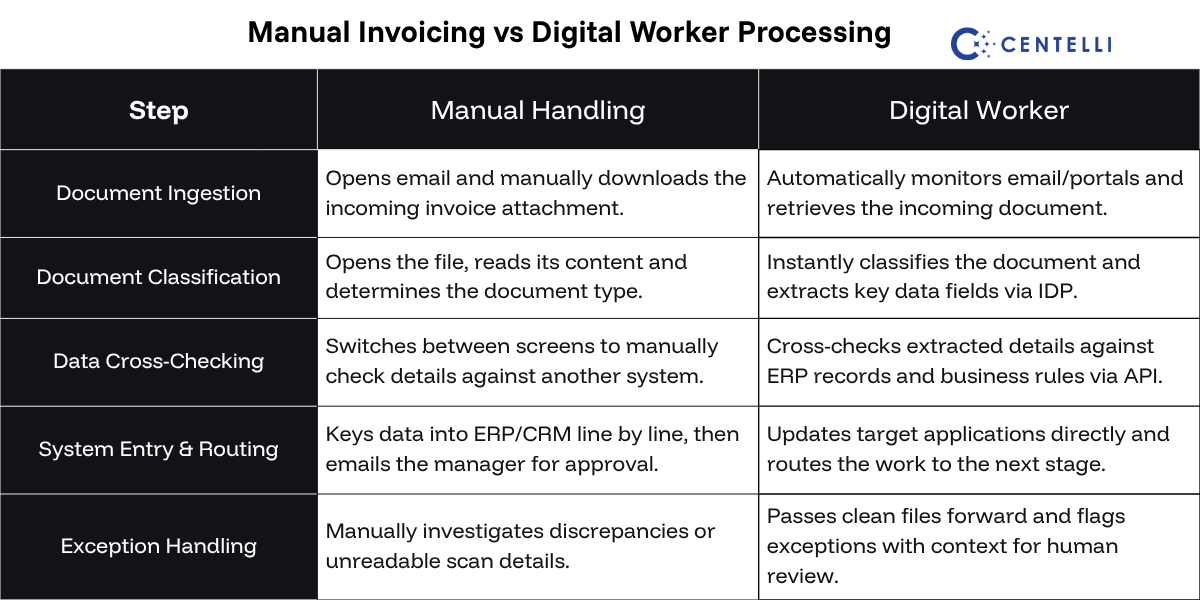
Significantly, the work rarely stays inside one application or system. Digital Workers can move data between systems to complete the process, triggering the next steps rather than stopping at ingestion.
The tools used at each step may vary depending on your setup, however. A Digital Worker might use OCR or IDP to obtain information, an API to retrieve data from an ERP, and business rules to validate it. Where no API is available, it uses RPA to interact directly with application interfaces.
Takeaway: Automated document processing reads and understands the document, while a Digital Worker uses that information (much like a person would) to complete the end-to-end workflow.
How Documents Enter Automated Workflows
Document processing turns files into data; the Digital Worker turns that data into action. But before any of this can happen, the document needs to be digitally available to the automated workflow.
Markedly, documents enter a business’s digital ecosystem in different ways. Some start as paper, while others are already digital.
Paper File Needs Digital Capture First
Paper documents must be captured and converted into a digital file before software can process them. Depending on document volume, people may load bulk batches into multifunction printers (MFPs) or scan individual files manually.
At this stage, the human role is operational: preparing physical pages and uploading digital files into the queue. The automated workflow then takes over data extraction.
A typical pathway looks like this:
Paper document → Scanner / Capture device → Digital image or PDF → System repository → Automated processing
Once the document is digitised and available to the Digital Worker, downstream processing is automated.
Digital Document is Already in a System
Digital documents enter automated workflows through email, online repositories, web portals, cloud storage or APIs. They are already in electronic from and don’t need physical capture. A Digital Worker might pick up:
- PDF invoices, resumes or statements available as email attachments
- Supplier onboarding forms or claim submissions uploaded through a web portal
- Contracts, purchase orders or policy files deposited in SharePoint or cloud storage
- Customer applications or registration forms submitted via digital web forms
- Structured order files or transactional payloads pushed directly via APIs
A Digital Worker monitors these sources, retrieves incoming files, and starts the workflow automatically. But being digital does not always mean being easy to process. Born-digital documents carry machine-readable text ready for immediate parsing. Scanned paper documents and image attachments are merely pixels that must be decoded into text first.
Takeaway: Digital Workers process text-based PDFs and e-forms directly. They rely on OCR or visual AI to extract text from scans and photos. Regardless of the ingestion path, they can work with both once integrated into the digital workflow.
Once Digitised, Both Paths Converge
Whether a document started as physical paper or arrived as a digital file, both enter the same automated stream once they are digitally available.
While extraction methods vary based on layout complexity, the downstream goal remains the same: the Digital Worker validates the extracted data against business rules, updates target systems and triggers the next steps in the workflow.
Typical Digital Worker Automated Document Processing Workflow
While extraction mechanics vary based on file format, downstream workflows operate in two clear directions: processing incoming documents from external sources or generating and dispatching outgoing documents from system data.
Following table shows how a Digital Worker may orchestrate inbound document journey:
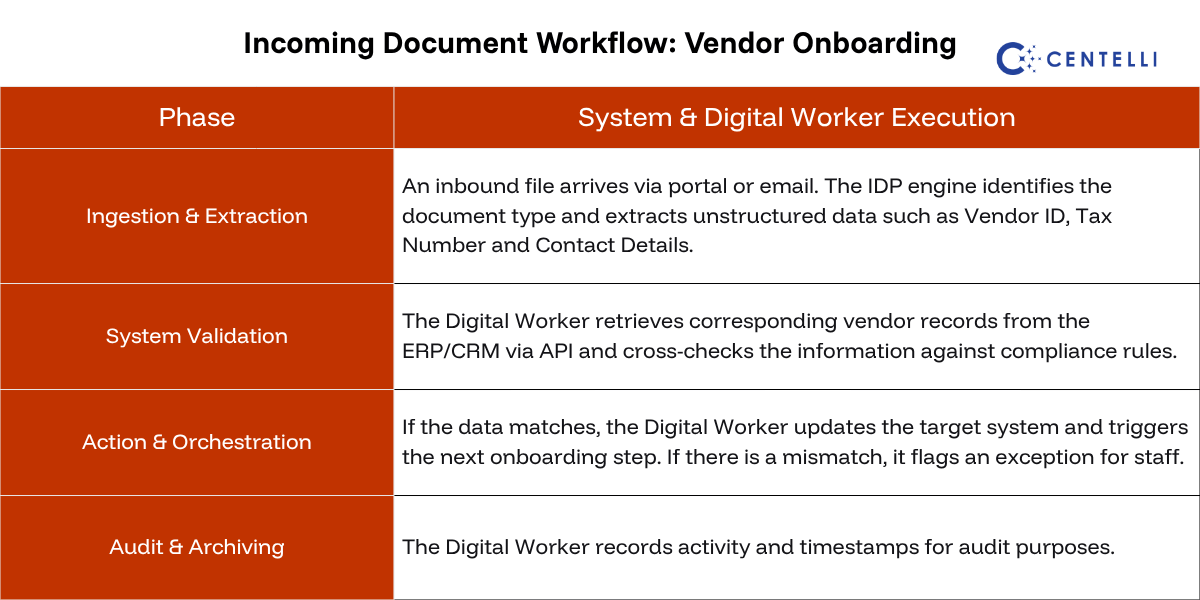
Table below presents how a Digital Worker may orchestrate outbound document journey:
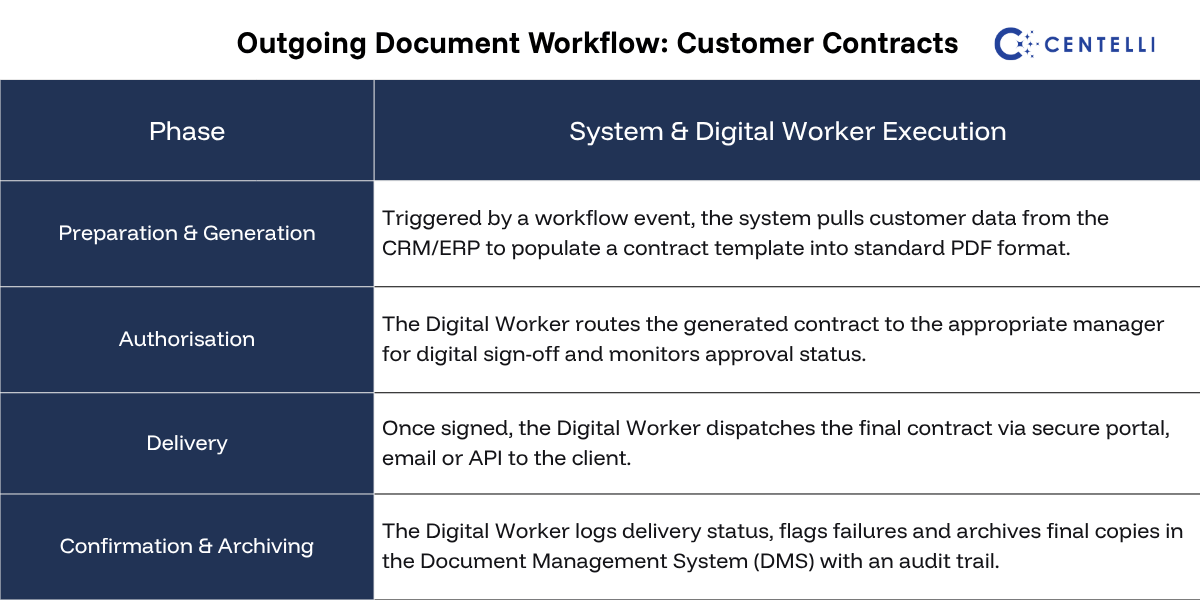
Takeaway: Digital Workers aren’t limited to handling inbound documents. They can also automate and orchestrate the generation, approval, sending, and archiving of outbound documents.
Document Automation, Digital Workers, and Humans-in-the-Loop
Automated document processing does not necessarily mean that the end-to-end workflow is fully autonomous. A human-in-the-loop (HITL) approach allows Digital Workers to handle repeatable workflow steps autonomously. People intervene where it really matters. This could be for approvals, exceptions and decisions that require human judgement.
Straight-through processing works best when the data is high-confidence, documents are digital-native or reliably captured, information matches existing system records, and business rules are clear and low-risk.
Our custom Digital Workers leverage AI-powered document understanding, processing each invoice in just 4 minutes for one of our esteemed clients. For another, we built Digital Workers capable of handling 200+ sales memos daily per bot. Schedule a free consultation today to explore what’s possible for your business.
However, human review becomes essential for high-stakes workflows, regulated processes, high-value transactions, or cases where information is incomplete or ambiguous. So, a Digital Worker may loop in a human reviewer for:
- Exceptions: A scan is faded or blurry, required fields are missing, or an invoice total is read correctly but does not match the purchase order in the ERP.
- Approvals: An invoice exceeds a pre-set threshold, a new vendor profile is being onboarded, or a credit memo exceeds standard policy limits.
- Decisions: Ambiguous terms in a custom contract need interpretation, a disputed charge requires vendor negotiation, or a complex insurance claim demands context-aware assessment.
Takeaway: Digital Workers don’t guess what to do when something requires human review. They flag the item, package it with relevant context for the designated reviewer, and immediately continue processing the next item in the queue.
Business Value of Digital Worker Document Automation
The value of document automation is not only that a machine reads or processes faster than a person. The real opportunity lies in removing repetitive manual work across the process by deploying Digital Workers:
- Time Saving: Digital Workers reduce time spent opening documents, rekeying information, checking routine data, moving files and following up on the next step.
- Cost Saving: Digital Workers reduce the manual effort required to process the same document volume, particularly in high-volume, repetitive operations, lowering overheads.
- Scalability: Teams can handle fluctuating or growing document volumes without adding manual headcount at the same rate.
- Accuracy: Fewer manual handoffs and consistent application of business rules reduce errors, process gaps and compliance slips.
- Visibility: Automated workflows provide a clear, trackable record of what was processed, what happened next and where exceptions are waiting for review.
You May Also Like: Automating Unstructured Data for Scalable, Unattended Workflows
The exact value varies by process, notably. It depends on document volume, process complexity, the number of systems involved and how much manual work the process currently requires.
Need more information or have questions about Centelli’s business automation services & solutions? Write to us.